Dell
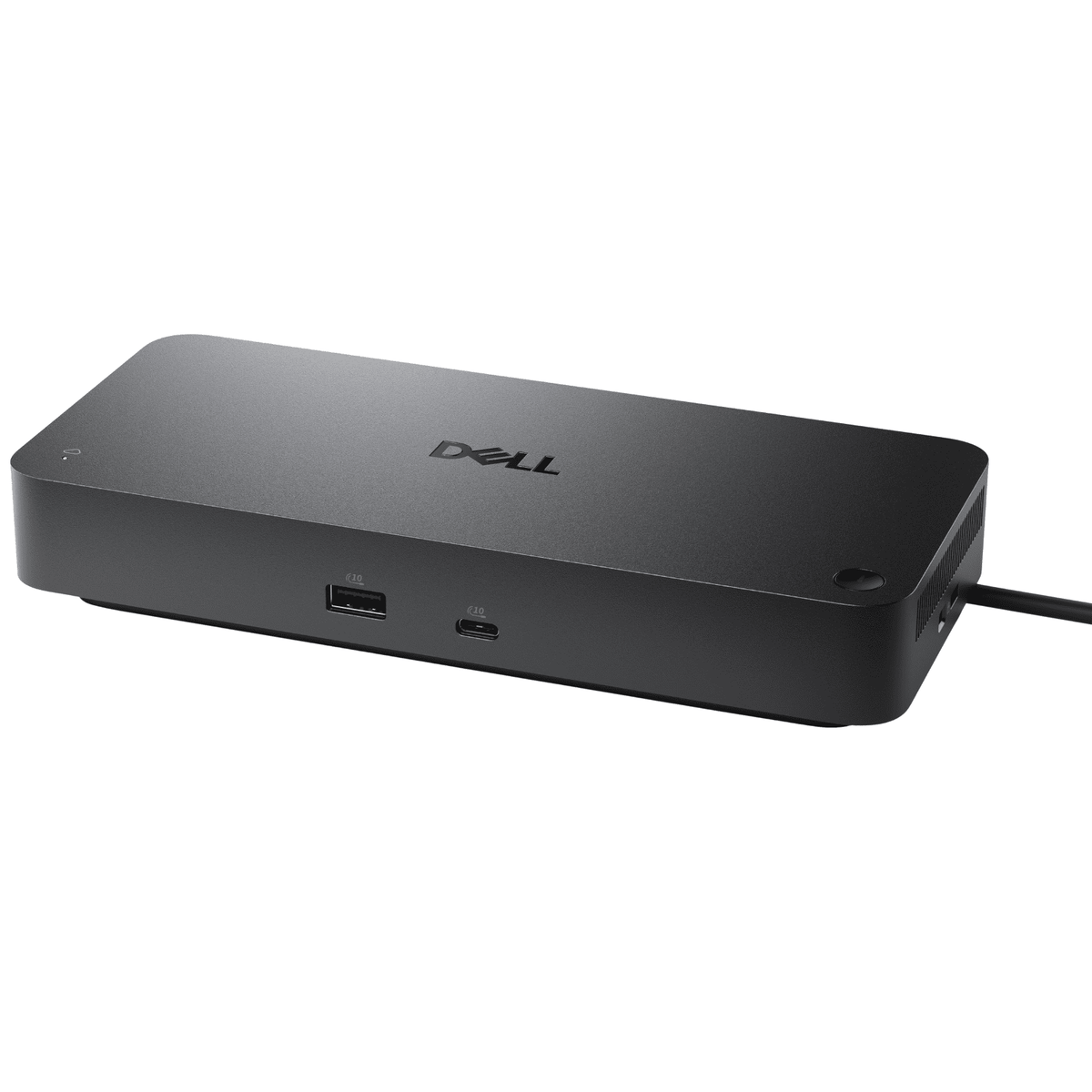
Dell Pro Thunderbolt 4 Smart Dock SD25TB4 - USB-C Station 130W, 4 x 4K Displays, 2.5GbE
Dell Pro Thunderbolt 4 Smart Dock SD25TB4 - USB-C Station 130W, 4 x 4K Displays, 2.5GbE
It addressed the limitations of the previous dock, better video resolution and dual monitor support.
The power cable doesn't have a light that tells you if the cable is securely connected to the laptop. The three USB-C ports in the back are nice but too many. 2 DP + 1 HDMI feels excessive.
this product solved a mult screen problem I was having with the ealier Docking station.
the slim design fits under my monitors.
it has an on / off button on the top. nice to have.
We use these on all our Dell Pro 16 laptops, makes it very easy to use 3 monitors with keyboard and mouse, good amount of USB ports. Very easy to setup and simple, just plug and play.
If I had one thing I would wish for it would be more video ports so you could use all 3 HDMI or all 3 DP instead of having to mix and match. Not a major, just a wish. (and yes, there is a mini-dp port so you CAN have all 3 monitors be DP, but that still means a different cable)
Fairfax County has been using the Dell Pro Thunderbolt 4 Smart Dock for a few months, and overall, it's been a reliable upgrade for the workspace. The power is far better than the previous model docs. It has more display ports, USB ports and updates the firmware automictically. We experienced significant issues with the docks that came before the SD25TB4 and now the incident calls have been reduced traumatically.
- 5 stars: 33 (87%)
- 4 stars: 4 (11%)
- 3 stars: 1 (3%)
- 2 stars: 0 (0%)
- 1 star: 0 (0%)
It addressed the limitations of the previous dock, better video resolution and dual monitor support.
The power cable doesn't have a light that tells you if the cable is securely connected to the laptop. The three USB-C ports in the back are nice but too many. 2 DP + 1 HDMI feels excessive.
this product solved a mult screen problem I was having with the ealier Docking station.
the slim design fits under my monitors.
it has an on / off button on the top. nice to have.
We use these on all our Dell Pro 16 laptops, makes it very easy to use 3 monitors with keyboard and mouse, good amount of USB ports. Very easy to setup and simple, just plug and play.
If I had one thing I would wish for it would be more video ports so you could use all 3 HDMI or all 3 DP instead of having to mix and match. Not a major, just a wish. (and yes, there is a mini-dp port so you CAN have all 3 monitors be DP, but that still means a different cable)
Fairfax County has been using the Dell Pro Thunderbolt 4 Smart Dock for a few months, and overall, it's been a reliable upgrade for the workspace. The power is far better than the previous model docs. It has more display ports, USB ports and updates the firmware automictically. We experienced significant issues with the docks that came before the SD25TB4 and now the incident calls have been reduced traumatically.
The dock works great. We have many things connected to it and no issues at all. This makes life easy to take a laptop from the office and back to home. They last a long time and we are very happy with the purchase.
It has plenty of connections for additional monitors or USB devices. It's nice to see that the NIC has been upgraded to 2.5gb. I did have to reboot it once to get an external drive to work with it.
This device is doing a Great Job powering up our Dell Curved 49" Monitor ! We see the fast response it has to handle all the work -load and seperate screen views with Windows 11 . Thank you for suggesting this model. Things are running smoothly for our new employee in our Admin Building.
Perfect size , great connectivity. I would prefer another port C-type
Solid docking station with reliable performance and easy setup. I've had a good experience with it and haven't encountered any issues.
Very nice dock and charged the laptop faster than the power adapter. Video is nice as well.
Small and compact. So many ports and works flawlessly with the new Dell Pro 5. Super happy with with the dock and it looks really good as well. It's a nice touch from previous models to be able to pick which side the cable faces for your laptop.
We constantly unplug from the docking station and head home. Or from home and just head to the office. The docking station never blinks, we just sit down and 2 monitors ready.
I use it to connect my laptop to monitors and it works great
Tons of ports, supports multi high resolution displays
I have used a few docking station from Dell previously and it seems like the new design of this is the best yet. Love all of the ports to be used and my Dell laptop picked it up quickly. All my monitors, ethernet and the mini display port really came in handy for me as well.
The Dell Pro Thunderbolt 5 Smart Dock (SD25TB5) is designed for modern, high-performance work setups, and it delivers a strong mix of speed, connectivity, and simplicity.
Excellent dock for my home office setup.
I bought the Dell Pro Thunderbolt 4 Smart Dock to use with my Dell Pro 16 Plus laptop, which I keep mostly closed and connected to a large extra-wide monitor, wired network connection, and external speakers.
For my purposes, this dock does exactly what I needed. It gives me a clean, practical one-cable setup and keeps the laptop connected to everything on my desk without constantly plugging and unplugging multiple cables. The build feels solid, the port selection is very good, and the connection has been reliable.
I especially appreciate having the DisplayPort connections and the wired network port, since this setup is meant to function more like a desktop workstation than a travel laptop.
After about a month of use, I'm very happy with the dock. It is not cheap, but for a permanent home office setup with a business-class Dell laptop, it feels like the right companion device.
I am only beginning to use the docking station, but I am pleased with it. It has a sufficient number of ports such that I don't need to add a hub.
This is a high-quality dock for laptop workstations. It powers the laptop well and provides additional ports. It also provides multiple monitor options. Works great!
This is a high-quality dock for the more powerful laptop workstations. It powers the laptop well and provides additional ports. It also provides multiple monitor options. Works great!
works great for my purposes. no lag and feels great
I bought this for my home office I work from home four days a week and wanted a docking station that I could use for both my work and personal laptop. It has been working great! All I have to do is unplug one laptop and plug in the other and everything is perfect. I really like that all the cords are in the back but it still has two USB plugs in the front for removable peripherals such as external hard drives and SD card readers.
We started buying these because users were having a problem with screens attached to WD22TB4 docking stations going blank. These have more ports and so far, have not suffered from the same screen blanking problem, so we're happy.
I have been using the dock to replace my main desktop. The versatility has been fantastic. I love being able to pick up and go with exactly what I need already prepared and only need to work through a single device. It works without any fuss or fumbling around and had no issues with getting an output from any device I tested. I also love that I am able to use this to charge devices without needing a device attached. This helped to cleanup my desk space which I always appreciate. I do wish that the TB5 cable was not directly attached in case of damage but acknowledge that the cable has fantastic build quality and feel that typical use would not result in accelerated damage. I did have an issue where plugging in my Windows 11 laptop would bring up one of my external monitors in 480p. I found that unplugging the monitor cable then re-plugging back in resolved this. I did not have this problem with any other devices I tested. Relatively minor though with it being my primary use case and happening consistently, it was somewhat frustrating. I also wish the dock had audio-out capabilities. Using the AUX out from a monitor or from the laptop itself can be cumbersome depending on the setup. Overall this has been fantastic for my use case and I have had very few issues. I connect to many peripherals and none had any difficulty with the dock which was my primary concern before testing. I am very happy with the dock and would recommend it as an option.
The Dock provides quick, preconfigured access to my peripheral devices, and is small and easy to keep organized so there isn't a mess of cables all over my desk - definitely recommended!
I've been using the Dell Pro Thunderbolt 5 Smart Dock (SD25TB5) as my daily driver in a pretty demanding work setup, and it's one of the few docks that actually delivers on what it promises.
I'm running multiple high‑resolution monitors and a rotating array of power-intensive peripherals, and I've thus far been unable to exceed the dock's limits. No flickering, no weird scaling issues, no "slow charging" warnings. My past docks were either monstrosities or would choke once I went beyond a basic dual‑monitor setup, so this is a noticeable step up.
Being in a managed environment, the Smart Dock capabilities are a nice touch too. Having the ability to upgrade the device's firmware remotely will be a huge time-savings once we've deployed these across all of our locations.
The only minor nitpick is the size/weight. It's bigger than the pictures seemed to indicate (the size/weight listed in the product description are accurate though -- I double-checked), but that seems like a fair tradeoff given its heavy-duty performance capabilities.
Overall, very impressed with this product and will be recommending this as our standard moving forward.
Excellent dock—easy to set up, reliable, and performs exactly as expected. The Thunderbolt 4 connectivity is fast and stable, supporting multiple devices without any issues. Dell's quality and support continue to be top-notch. Highly recommend.
This dock has 2 DisplayPorts and 1 HDMI, so if your display doesn't have DP, you'll need adapters for those 2. Other than that, It has 6 usb ports (3 type A and 3 type C) It has a charge through port on the front as well as a Type A for all those logitech receivers floating around.
The included power block is bulky, but it's not even warm after a full month of being plugged in. I have space to deal with it, but others might not.
Overall, this dock is easy to set up and would be a great addition to any setup.
Couldn't load pickup availability
Highlights
- Single Thunderbolt 4 cable carries 40Gbps of data, video and power
- Up to 130W power to Dell notebooks, 96W to non-Dell, from 180W adapter
- Drives four 4K 60Hz displays, two 6K 60Hz, or one 8K 60Hz with DSC
- Video out: 2 x DisplayPort 1.4, HDMI 2.1, USB-C DP 1.4, 2 x Thunderbolt 4
- Four USB-A 3.2 Gen 2 and one USB-C 3.2 Gen 2 port, all rated 10Gbps
- 2.5 Gigabit Ethernet RJ45 with MAC address pass-through and PXE boot
Specifications
- Display: 5K WUHD,4K UHD,1440p QHD,8K UHD
- Color: Black
- Included: Power adapter
- Condition: New
- Warranty: 1-year warranty
Shipping & returns
- Ships from our own US warehouse — most orders leave within 1 business day.
- Free shipping on orders over $499.
- 30-day returns, no restocking fee.
- 1-year warranty included.
Share